Snip any desired computer area
Free Snipping Tool is a desktop utility that enables you to extensively create snips of any part from your computer screen. Your PC offers a built-in snipping tool that allows you to do the same function mentioned but this program actually provides additional options for screenshot sharing which makes it an even more satisfying alternative.
This impressive substitute permits you to share and save your snips on Google Drive, Dropbox, FTP or even send it as WebRequests. You will be able to freely experience Free Snipping Tool's full service without any restrictions.
Create snips with ease
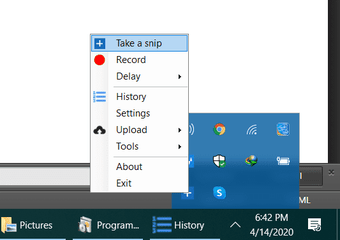
You can start capturing any desired desktop area by pressing the shortcut icon of the downloaded program, clicking the 'take a snip' option from the tool's icon from your system tray or simply hitting the PrtScr button on your keyboard. You will then be greeted by a rectangular-shaped snipping part wherein you can designate on any part of your screen.
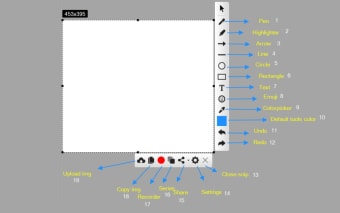
The screenshot taken will appear within the main window once you saved it. There is a toolbox displayed in the program that you can utilize to highlight or freely draw on top of the picture using the pen tool. In addition, it also features a few simple shapes that you can overlay onto the image, including lines of different width, circles, rectangles, and arrows.
If you're already satisfied with the processed screenshot, a shareable link will automatically be generated after saving it. You can send it to anyone which will allow them to preview it on a web browser. Aside from that, it offers more sharing options like uploading the image to an FTP server or storage services including Dropbox or Google Drive. Not to mention, it also supports sending WebRequests to any webpage.
Snip and share all you want
Free Snipping Tool is a handy and more extensive screen capture solution that can also be an excellent alternative to your Windows screenshot tool. Compared to the built-in utility, this third-party program offers a more packed editing suite that can be a great addition to your print-screened image. Furthermore, it provides many sharing options that will allow you to easily send and transfer the snipped photo.













.png)